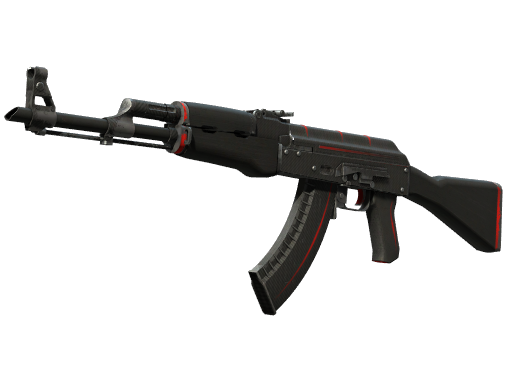
Two identical AK-47 | Redline skins in Field-Tested condition can differ in price by 15–20%, even though the listing name is exactly the same. The reason is float value — a number that describes the actual look of a skin far more precisely than any "Field-Tested" label ever could. If you buy skins worth more than a couple of dollars and never look at float, you are almost certainly overpaying. Let's break down how it works and how to make it work for you.
What float value actually is
Float is a number between 0.00 and 1.00 generated the moment a skin comes into existence (case opening, drop, trade-up contract) and written into its data forever. The closer the float is to zero, the fresher the skin looks: fewer scratches, less faded paint, cleaner edges. The closer to one, the more beaten-up the texture gets.
Here is the fact that still confuses newcomers: float never changes over time. A CS2 skin does not degrade from matches, kills, or the number of owners it has had. The number a skin was born with stays with it forever. Buy a Redline at 0.16 float, and five years later it will still be exactly 0.16.
Wear ranges: the official table
The full 0-to-1 scale is split into five wear tiers. The boundaries are fixed and identical for every skin in the game:
| Wear | Float range | In short |
|---|---|---|
| Factory New (FN) | 0.00–0.07 | Fresh off the line, near-flawless |
| Minimal Wear (MW) | 0.07–0.15 | Light scuffs along the edges |
| Field-Tested (FT) | 0.15–0.38 | Visible scratches, the widest range |
| Well-Worn (WW) | 0.38–0.45 | Heavy wear, paint peeling |
| Battle-Scarred (BS) | 0.45–1.00 | Maximum wear, down to bare metal |
Note how wide those ranges are. FT covers 0.15–0.38 — nearly a quarter of the entire scale. Within that single tier you will find skins visually indistinguishable from MW (float 0.15–0.18) sitting next to genuinely rough examples above 0.35. Both sell under the same label. For a detailed tier-by-tier breakdown with examples, see our wear tiers guide.
Why the same wear tier looks different on different skins
There is a second layer of complexity: every skin has its own min and max float defined by its finish. The full 0.00–1.00 range is not available to everyone.
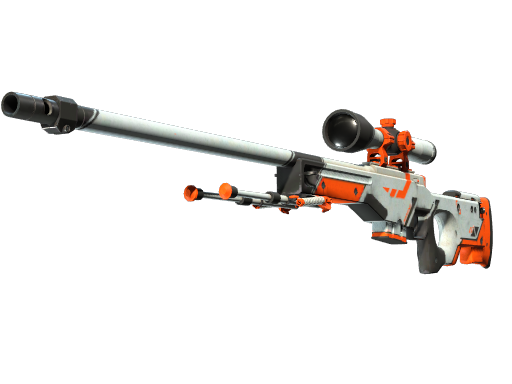
The classic example is the AWP | Asiimov: its minimum float is 0.18, which means an Asiimov physically cannot exist in Factory New or Minimal Wear. The AK-47 | Slate, on the other hand, starts at zero, and finding one in FN is trivial.
The practical takeaway: FT on one skin and FT on another represent different amounts of visible damage. If a skin's min float is 0.18, its best possible FT copy looks like the worst FT of a skin whose range starts at 0.00 — simply because it cannot go any lower.
How float moves the price: a live example
Let's look at a market classic — the AK-47 | Redline. Here is the current FT price across marketplaces:
And here is what sellers ask for Minimal Wear:
The gap between tiers is usually measured in tens of percent — for crossing a formal boundary at 0.15. Meanwhile, a Redline at 0.151 float and one at 0.149 are visually identical: the same black body with red stripes, the same micro-scratches. But the first sells as FT and the second as MW, at a noticeably higher price.
Low float within a tier carries its own premium
The market also differentiates prices inside a single tier. An FT copy with a 0.15–0.17 float gets listed as "top float FT" and commands 5–15% above the median. Copies at 0.35–0.38 (the worst FT) sell at a discount instead. On collector-grade skins like the AWP | Dragon Lore, low-float hunting becomes a discipline of its own: the difference between 0.150 and 0.153 can be worth hundreds of dollars.
How to check float before buying
Three methods, in order of convenience:
- In-game inspection. Request an inspect link and view the skin in CS2. You won't see the float number, but you will see the real texture condition. Slow, but honest.
- Inspect services. Third-party sites take an inspect link and return the exact float, pattern index, and sticker positions.
- The item page on reSkins. Every item in our catalog has a float-check button — you see the exact value before buying, without leaving the page. The same card compares prices across Skinport, Lis-Skins, and Market.CSGO, with data refreshed every 30 minutes.
Buyer's checklist
- Compare floats, not just tier names. Two "Field-Tested" listings are not two identical skins.
- On dark skins (Redline, Slate), buy a cheap mid-float FT — the low-float premium doesn't pay off visually.
- On light skins (Asiimov, Printstream), float is critical: always check the inspect view.
- Check the price of the neighboring tier. Sometimes MW costs only 10% more than a top-float FT — and then MW is the better deal.
Bottom line
Float is the biggest price factor after the skin model itself. Remember three things: float never changes over time; every skin has its own min/max range; prices within a single tier vary by tens of percent. Check the exact value before buying and compare offers across platforms — the reSkins catalog does it automatically and routes you to the cheapest listing.